How to Connect Meta Ads to Claude
How to connect Meta Ads to Claude with Meta's official connector: the setup steps, prompts for reporting and tracking checks, and how to stop ads going live.

Ads Manager can do almost anything, but finding out which campaign is wasting money means setting up columns, filters and date ranges first.
In April 2026 Meta launched its own AI connectors, so Claude can read your campaign data and build campaigns for you. Connecting Meta Ads to Claude takes a few more steps than a one-click install, because it's added as a custom connector using Meta's server address.
What you need before you start
- Any Claude plan. Custom connectors work on every plan, including Free, though free accounts are limited to one, according to Anthropic's help page.
- A computer. Claude's phone apps can't add new connectors yet.
- A Facebook login with access to your ad account. This is what you'll sign in with, so it decides what Claude can see.
- On a Team or Enterprise plan, an owner. Only owners can add the connector for the organisation. Members then connect it individually.
How to connect Meta Ads to Claude
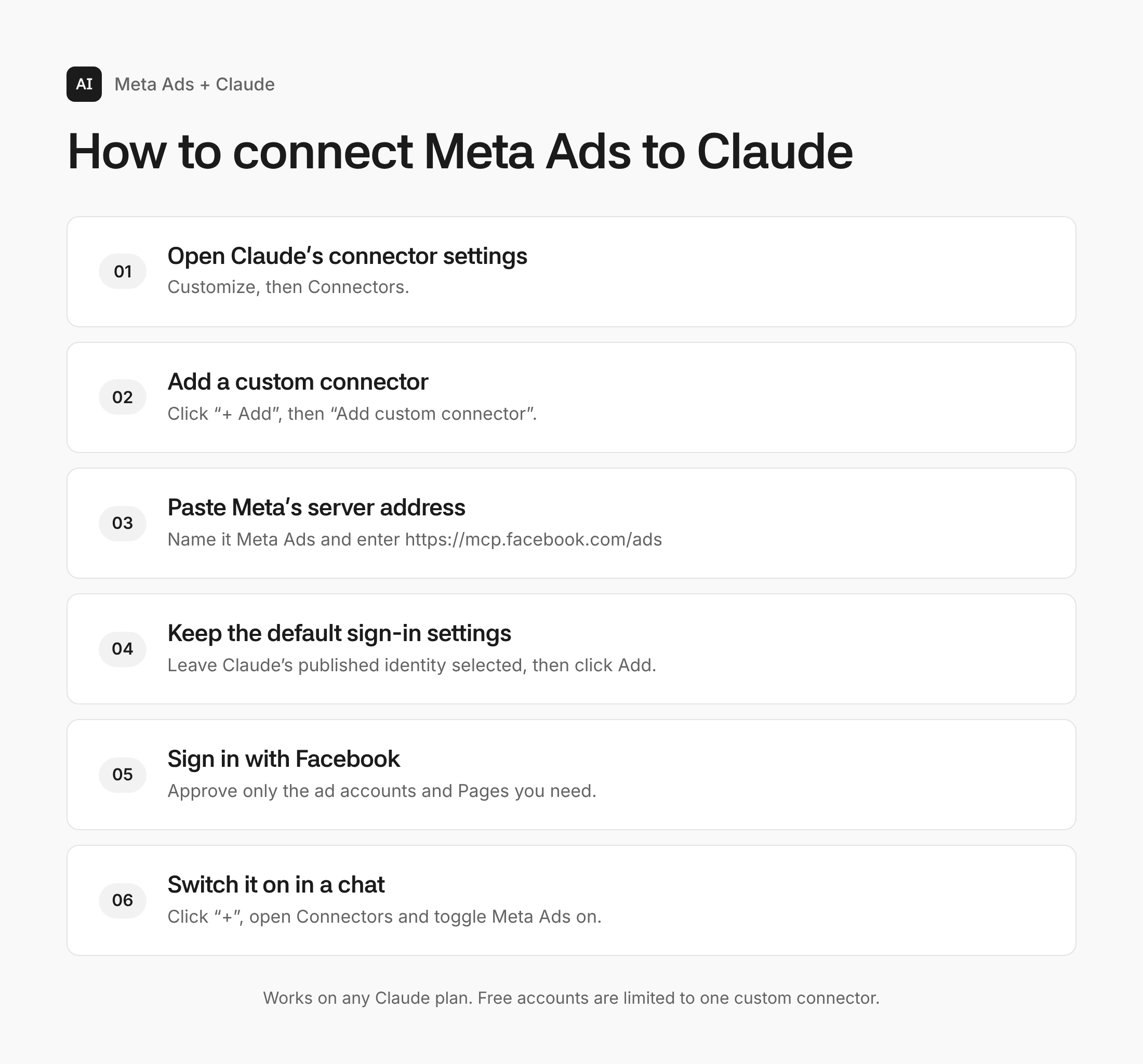
- Open Claude's connector settings. Go to Customize, then Connectors.
- Add a custom connector. Click "+ Add", then "Add custom connector".
- Paste Meta's address. Name it "Meta Ads" and enter the server URL,
https://mcp.facebook.com/ads, then click Continue. - Keep the default sign-in settings. Review the authentication screen, leave "Use Claude's published identity (Recommended)" selected, and click Add.
- Sign in with Facebook. Meta asks you to log in and approve access. Grant only the ad accounts and Pages you want Claude working on.
- Switch it on in a chat. Click "+" in the chat box, open Connectors and toggle Meta Ads on.
What you can ask it
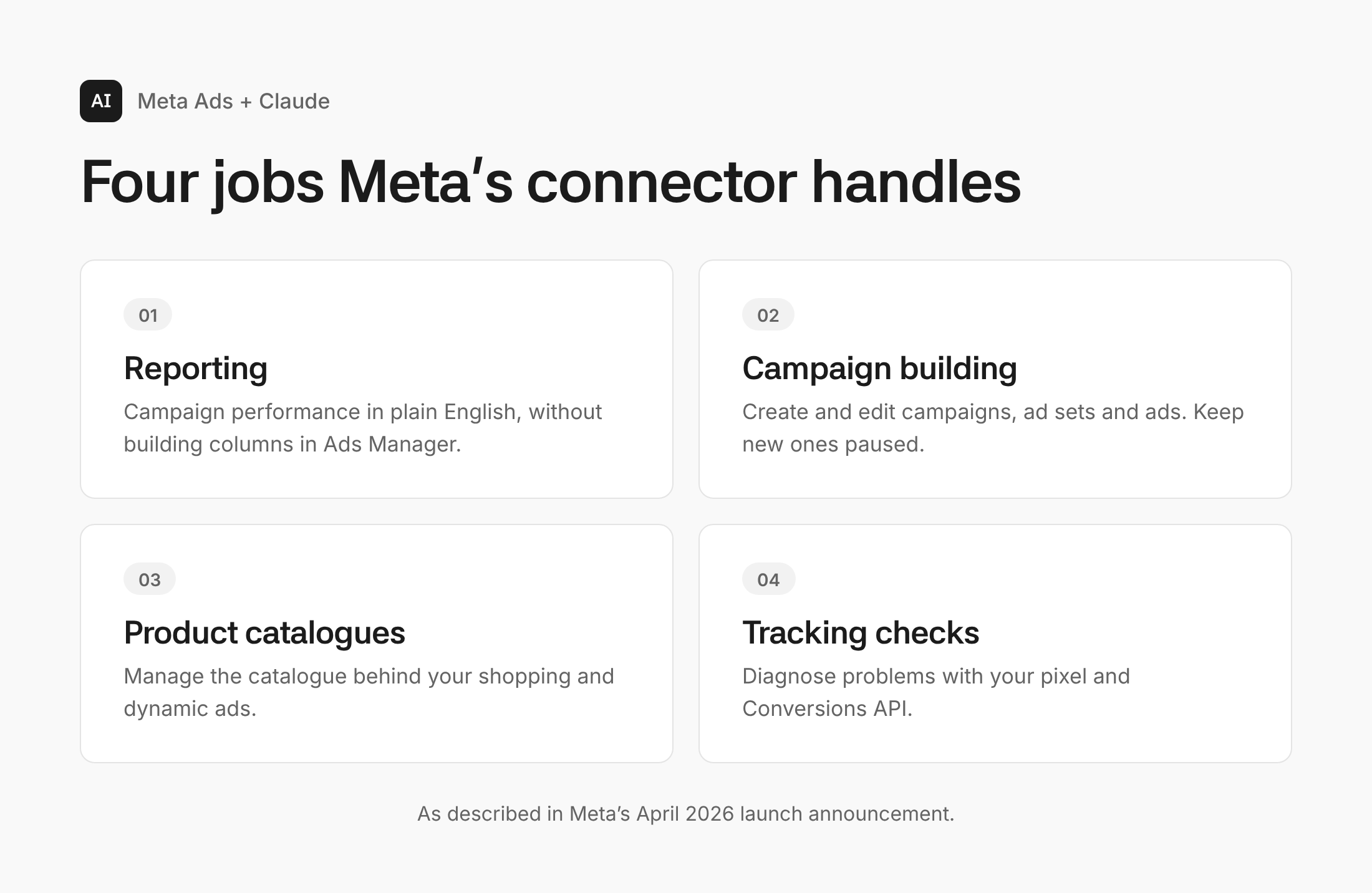
Meta's announcement, as reported by PPC Land, covers four jobs: reporting on performance; creating and editing campaigns, ad sets and ads; managing product catalogues; and diagnosing tracking problems with your pixel and Conversions API.
Three prompts to start with:
Using Meta Ads, compare cost per purchase across my active campaigns for the last 14 days. Tell me which one you'd cut and why.
Using Meta Ads, check whether my pixel and Conversions API are sending purchase events correctly, and list anything that looks broken.
Using Meta Ads, draft a new traffic campaign for [product] aimed at [audience]. Leave everything paused so I can review it.
Run the tracking check first. If purchase events aren't reaching Meta, its delivery system optimises on bad data, and that's easy to miss in Ads Manager.
Where it goes wrong
- Assuming nothing goes live. Meta's command-line version creates everything paused by default, and third-party testers report the connector behaves the same way. Still, ask for "paused" in the prompt and check the status yourself before walking away.
- Resetting the learning phase. Ad sets need time to settle after changes. A Meta client partner quoted at launch advised reminding your AI about the learning phase, so don't let Claude tweak live campaigns every day.
- Images that won't upload. Third-party guides report that new ads need images hosted at a public web address, so a file on your desktop may not work. Upload creative to your site or Meta first.
- Acting on its recommendations without context. Claude sees cost per purchase, but not your margins, stock levels or which product you're trying to push. Weigh those before you cut anything it flags.
- Handing over every account. Claude can only reach what you approve at sign-in, so if you manage several ad accounts, grant the one you're working on.
Before giving any AI write access to your ad spend, read up on what an AI agent is and whether your business needs one yet.
Get AI advice built around your business
AI Manual is building a service that learns how your business runs and shows you where AI is worth using, ad spend included. It isn't open yet. Contact us and you'll be among the first in.
Keep the spending decisions yourself
The reporting and tracking checks justify connecting Meta Ads to Claude on their own. Let Claude answer the questions Ads Manager makes slow, review any campaign it drafts while it's still paused, and decide budgets and cuts yourself.