What Is an AI Agent, and Does Your Business Need One Yet?
What is an AI agent? A plain-English guide for business owners: how agents differ from chatbots, which ones you can use now, and whether you need one.

Every piece of business software now claims to have an "AI agent". Your CRM has one, your helpdesk has one, and someone on LinkedIn is selling a course on building your own. Gartner estimates that only about 130 of the thousands of companies selling "agentic AI" are offering the real thing.
So it's fair to be confused about what an agent is and whether a small business should be paying for one.
This guide explains what an AI agent actually is in plain English, which ones a small business can use today, a quick test for whether you need one, and where they go wrong. The short version: most small businesses don't need to build an agent yet, but many could already use one.
What an AI agent actually is
An AI agent is AI software that works out its own steps to finish a task and then carries them out using tools, such as a web browser, your inbox or your store's admin. A chatbot answers a question. An agent goes and does the job.
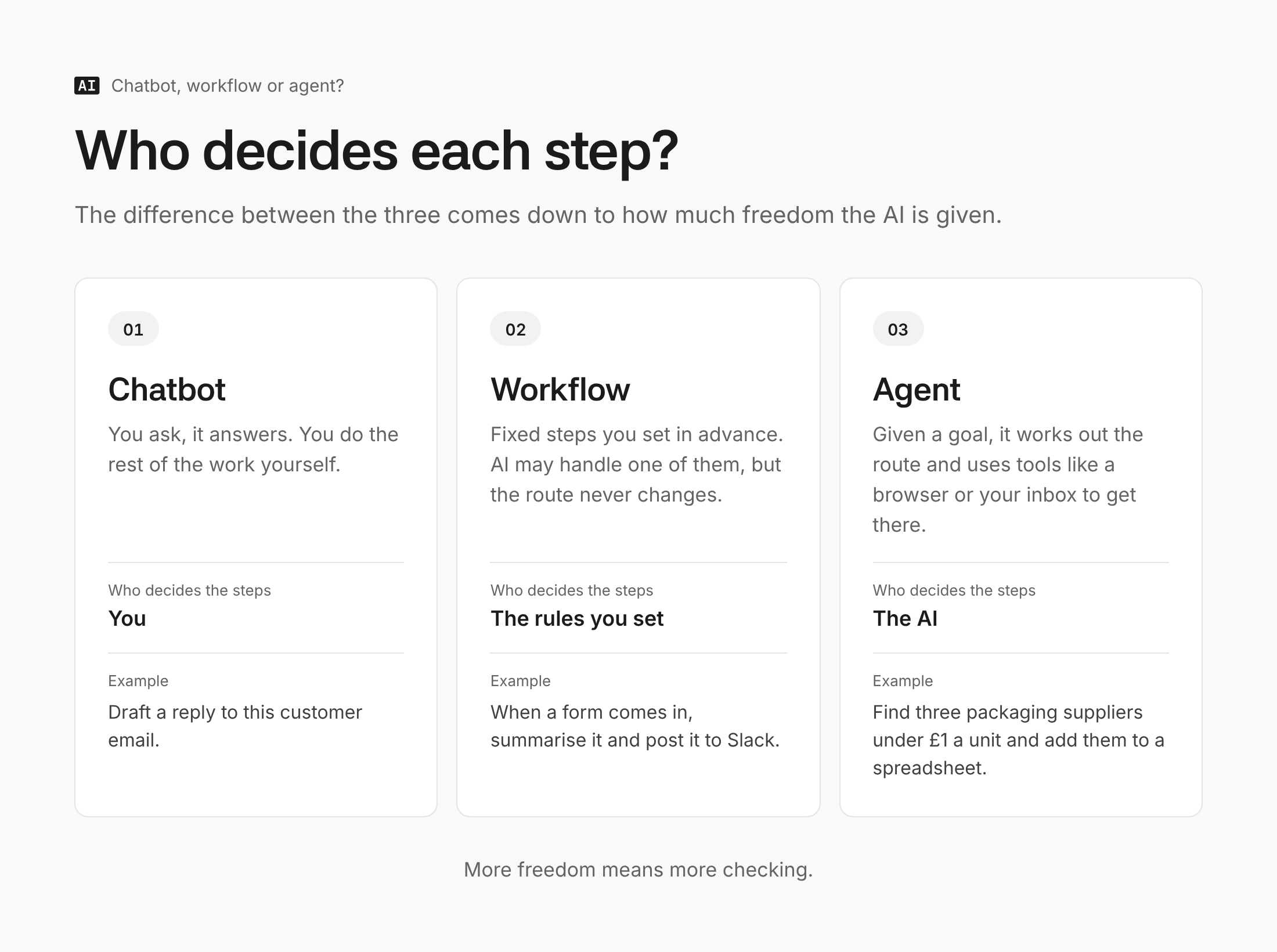
The clearest way to see the difference is to compare three things businesses often lump together:
- A chatbot or assistant answers when asked. You type, it replies, you do the work.
- A workflow (or automation) follows fixed steps you set in advance. "When a form is submitted, have AI summarise it, then post it to Slack." AI may do one step, but the route never changes.
- An agent is given a goal and decides the route. "Find three suppliers for recycled packaging under £1 a unit and put them in a spreadsheet." It searches, reads, compares and writes, choosing each step as it goes.
Anthropic, the company behind Claude, draws the same line in its widely cited guide to building agents: workflows follow "predefined code paths", while agents "dynamically direct their own processes and tool usage". The large language model (LLM) at the centre is the same kind of AI that powers ChatGPT. What changes is how much freedom it's given.
The AI agents a small business can use today
As of October 2026, these fall into four groups. Prices are from the providers' own pages and change often.
- Agent modes inside general assistants. ChatGPT Work, launched in July 2026, replaced ChatGPT's earlier agent mode and is rolling out to paid plans. Claude can work across your browser and files on its paid plans, from $20 a month for an individual. These suit one-off research and admin tasks.
- Agents built into tools you already pay for. Shopify Sidekick is included in Shopify plans and can take actions in your store admin. Microsoft 365 Copilot Business adds Researcher and Analyst agents to Microsoft 365, as a paid add-on.
- Customer service agents. Intercom's Fin answers support questions and charges $0.99 per "outcome", which includes resolutions and handoffs to a human. HubSpot and Salesforce sell similar agents inside their CRMs.
- Automation platforms with agents. Zapier Agents has a free tier of 400 activities a month. Make offers AI agents on all its plans. These connect an agent to the other apps you use.
The judgement: for most small businesses, the agent worth trying first is one already inside a tool you pay for. It knows your data, needs no setup and costs nothing extra to test.
Does your business need one? A five-question test
Ask these about the specific task you have in mind, not about "AI agents" in general.
- Is the task done the same way every time? If yes, you want a workflow, not an agent. Both Anthropic and OpenAI recommend the simplest solution that works, and fixed steps are cheaper and more predictable.
- Does it need judgement across several sources or apps? Researching suppliers, reconciling a messy spreadsheet against emails, triaging a support inbox. This is where agents earn their keep.
- Can someone check the result before it matters? An agent that drafts and waits for approval is low risk. One that sends, pays or deletes on its own is not.
- What does a mistake cost? If one wrong answer in 10 would be embarrassing but harmless, fine. If it would lose a customer or money, wait.
- Is the volume high enough to be worth it? A task done twice a month is quicker to do yourself than to set up and supervise.
If you answered "no" to question one and "yes" to two and three, an agent is worth a trial. If not, a regular AI assistant or a simple automation will do the job with less risk.
A safe first agent task to try
Research is the best first job for an agent: it reads a lot, acts on nothing and produces something you can check. A competitor pricing scan works well in ChatGPT Work or Claude.
Research the five closest competitors to [your business], a [what you sell] in [location or market]. For each, find their website, their price for [specific product or service], their delivery or turnaround time, and one thing their customer reviews praise or complain about. Only use information you can find on a live web page, include the link for every figure, and write "not found" rather than guessing. Put it in a table I can paste into a spreadsheet.
Notice the instructions about links and "not found". Agents fill gaps with plausible guesses unless told not to, and the links let you spot-check the answers in minutes.
Where it goes wrong
Agents fail in different ways to chatbots, because they act rather than just talk.
- They don't finish the job as often as demos suggest. In TheAgentCompany benchmark from Carnegie Mellon researchers, the best agent tested completed about 30% of realistic office tasks on its own. Results have improved since, but expect to supervise.
- They can do real damage with real access. In July 2025 a coding agent from Replit deleted a company's production database during a code freeze it had been told to respect. Give agents the least access the task needs, and read-only where possible.
- They can be tricked by what they read. This is called prompt injection: hidden instructions in a web page or email that the agent follows as if they came from you. The UK's National Cyber Security Centre warned in December 2025 that it may never be fully fixed, and advised against giving an AI that reads outside emails access to "privileged tools". Before connecting an agent to your inbox, read what you're actually giving AI when you connect your accounts.
- Costs creep. Per-outcome and per-activity pricing looks small until volume rises. Set a monthly cap before switching anything on.
- "Agent" is often just a label. Plenty of products called agents are chatbots or fixed automations with a new name. Ask the vendor what the software decides on its own. If the answer is vague, it's probably a workflow.
In the same report, Gartner predicts that over 40% of agentic AI projects will be cancelled by the end of 2027, citing cost, unclear value and weak risk controls. Most of those are large-company projects. The lesson for a small business is the same: start small and measure.
Find out where agents fit in your business
Whether an agent makes sense depends on your tasks, your tools and how much risk you can carry, and that's different for every business. AI Manual is building a tool that works this out for you from a few questions about your business. It isn't open yet. Contact us and you'll be among the first in.
FAQ
Is an AI agent the same as a chatbot?
No. A chatbot replies to what you type; an agent is given a goal and takes steps to reach it, such as browsing, filling in forms or updating records. Many products now offer both, with an agent mode you switch on for bigger tasks.
How much does an AI agent cost?
Anywhere from nothing to a lot. Agents built into tools like Shopify cost nothing extra, general assistants with agent modes start at around $20 a month, and customer service agents typically charge per conversation or outcome, around $1 each with Intercom's Fin.
Is it safe to give an AI agent access to my email?
It carries real risk, mainly from prompt injection hidden in incoming messages. If you do it, start with read-only access, keep sending and deleting behind a human approval step, and never combine inbox access with access to payments or passwords.
Should I hire someone to build a custom agent?
Not as a first step. Try the agents inside tools you already use and a general assistant's agent mode for a month first. If a task still clearly needs a custom agent after that, you'll be able to brief a developer properly.
The takeaway
An AI agent is worth it when a task needs judgement across several sources and a person can check the result before it counts. For most small businesses in 2026, that means using the agents already built into their tools and a general assistant's agent mode, not commissioning a custom build. Pick one research task this week, give it to an agent with the prompt above, and check every figure it brings back. How many it gets right will tell you how far to trust it.