How to Write Product Descriptions That Sell With AI
Learn how to write product descriptions that sell with AI: what to feed it, Shopify's Sidekick step by step, a ready-made prompt and the mistakes to avoid.
Shopify will write your product descriptions for free. Click a button, type a prompt, and a tidy paragraph appears. The trouble is that it reads like every other tidy paragraph on every other store, because it was written from almost nothing.
AI is good at writing product descriptions. It's bad at knowing your product. Most owners give it a title and two keywords, get something bland back, and decide it isn't worth the effort.
This guide shows how to get AI product descriptions that actually sell: what a good description needs, how to feed AI the facts, the exact steps in Shopify, and why AI shopping assistants now reading your store makes the details matter more than ever.
What a product description that sells actually does
A product description that sells answers the questions a shopper would otherwise leave your site to find. Who is it for, what does it do for them, what is it made of, will it fit, and what's included.
That's not marketing theory. In usability testing by the Nielsen Norman Group, incomplete or unclear product information caused 20% of all failed purchase attempts. The research is from 2014, but the point has aged well: as NN/g put it, losing a shopper to Google is "almost identical to losing the order".
A strong description usually covers:
- The outcome. What changes for the buyer, in one or two sentences.
- The specifics. Materials, dimensions, weight, capacity, compatibility, care.
- Fit and use. Who it suits, who it doesn't, how it's used day to day.
- What's in the box. And, just as useful, what isn't.
- One reason to trust it. A guarantee, a test, a standard, a real customer detail.
Give the AI facts, not a title
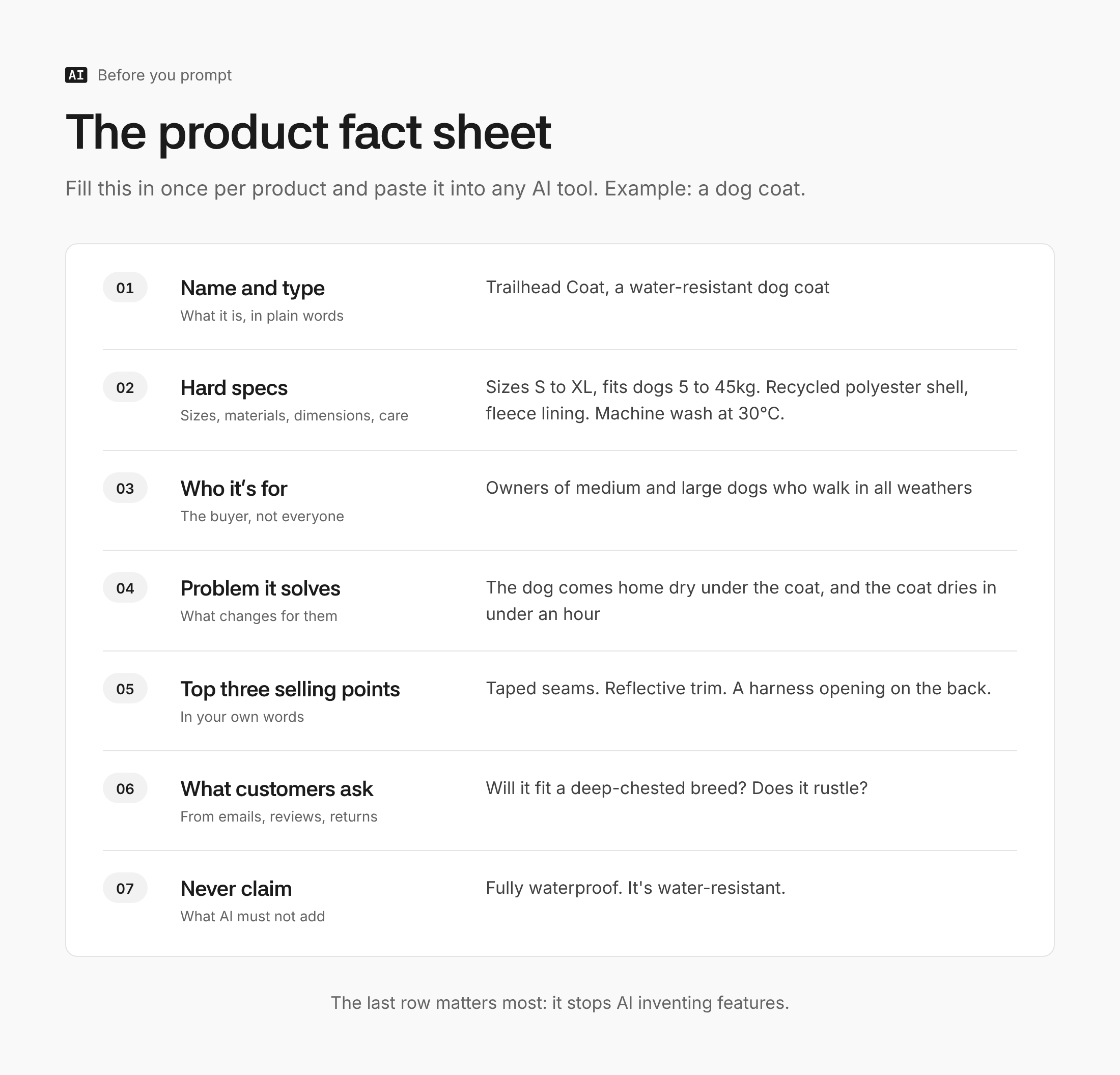
The single biggest improvement is what goes in, not which AI writes it. Before prompting, build a short fact sheet for each product. It takes a few minutes and it's reusable everywhere the product appears.
Include the product name and type, every hard spec, who it's for, the problem it solves, your three strongest selling points in your own words, common questions or complaints from customers, and anything it must never claim. That last one matters: an AI asked to "make it compelling" will happily add "waterproof" or "eco-friendly" if nothing stops it.
How to write product descriptions with Shopify's AI
Shopify's built-in AI is called Sidekick, and generating descriptions with it is included in every plan at no extra cost. AI Manual didn't open a Shopify admin for this guide, so the steps below follow Shopify's own help documentation.
- Go to Products in your Shopify admin and open the product you want to describe.
- Click the "Generate text" icon in the description editor's toolbar.
- Write your prompt. Shopify needs at least the product title plus two features or keywords. Paste in your fact sheet instead; it will do far better.
- State the tone in the prompt. There are no tone presets now, so ask for it directly ("plain and warm, no exclamation marks").
- Submit, then edit. The text goes straight into the description field. Check every claim, then click Save.
Two limits worth knowing: text generation doesn't work on the Shopify mobile apps, and Shopify's help page is blunt that you're responsible for the accuracy of everything you publish.
A better prompt for any AI assistant
For more control, or to write a batch at once, a general assistant such as ChatGPT or Claude gives better results with a structured prompt. This one works for most physical products.
Write a Shopify product description for the product below. Audience: [who buys it]. Brand voice: [three adjectives, plus one example sentence from our site]. Structure: one opening sentence on the main benefit, a short paragraph on who it's for and how it's used, then a bulleted list of specs, then one line on what's included. Use only the facts provided; if something a shopper would want to know is missing, list it at the end as a question for me instead of inventing it. Don't use these words: elevate, seamless, perfect, game-changer. Keep it under 180 words. Product facts: [paste fact sheet].
The instruction to list missing facts as questions is the most useful line in it. It turns the AI from a confident guesser into a checklist of gaps in your product data.
For a catalogue, export your products from Shopify as a CSV, add a fact sheet column, and run products through the same prompt in batches of five to 10. Review each one before importing; batch work is where errors slip through unnoticed. If the drafts all start to sound alike, there's a guide on how to stop AI sounding like AI that applies directly.
Write for AI shopping assistants as well as people
Your product descriptions are no longer read only by shoppers. Shopify's Agentic Storefronts, switched on by default for eligible stores, make products discoverable in AI assistants including ChatGPT, Microsoft Copilot and Google's AI Mode. When someone asks one of those for "a waterproof dog coat for a large breed under £40", the assistant reads product data to decide what to show.
That changes what a good description looks like. The feeds these assistants use, such as OpenAI's product feed spec, ask for factual, plain-text descriptions, and Google's Merchant Center guidance recommends putting the key details in the first 160 to 500 characters. In practice:
- Lead with the facts a buyer filters on: size, material, compatibility, use case.
- Spell things out. "Fits dogs 30 to 45kg" beats "great for bigger pups".
- Keep promotions out of the description. Merchant Center specifically excludes prices, sale wording and shipping offers.
- Fill in Shopify's structured fields (product type, variants, metafields) as well as the description. Shopify's catalogue extracts attributes from them.
The upside is that the descriptions that work for AI assistants are the same ones that work for people: specific, honest and easy to scan.
Where it goes wrong
- Invented features. The most common and most expensive mistake. UK consumer law applies to the claim, whoever wrote it, and the CMA's guidance says traders shouldn't give information that is "objectively false" about a product's main characteristics. The fact sheet and the "use only the facts provided" line are your defence. There's more on this in AI Manual's guide to using AI without it making things up.
- Publishing without reading. In January 2024 Amazon had to remove listings whose titles read "I'm sorry, but I cannot fulfill this request", an AI refusal pasted straight into the store. Every description needs a human read.
- Mass-producing thin pages. Google doesn't penalise AI-written content as such, but its spam policies treat generating "many pages without adding value for users" as scaled content abuse. Hundreds of near-identical descriptions are a risk.
- Variant mismatches. AI describes the product, not each variant. Check that colours, sizes and materials in the text match every option on sale.
- The same voice on every product. If all 200 descriptions open with "Introducing", shoppers notice. Vary the opening line by hand on your bestsellers.
Get AI advice built around your store
Product descriptions are one of dozens of places AI can save an ecommerce business time or make it money, and which ones matter most depends on your store. AI Manual is building a tool that works that out from a few questions about your business. It isn't open yet. Contact us and you'll be among the first in.
FAQ
Will Google penalise AI-written product descriptions?
Not for being AI-written. Google's guidance on generative AI content says to fact-check and review it, and warns against generating many pages without adding value. Accurate, specific descriptions that help shoppers are fine however they were drafted.
Is Shopify's AI description writer free?
Yes. Generating product descriptions with Sidekick is included in Shopify plans with no extra app needed, though Shopify says features vary by plan, device and language. It only works in the desktop admin, not the mobile apps.
How long should a product description be?
Long enough to answer a buyer's questions and no longer. Around 100 to 200 words with a spec list suits most products; technical or expensive items need more. Put the most important details first, since Google and AI assistants weight the opening.
Should I rewrite all my product descriptions at once?
No. Start with your 10 bestsellers and the products with the most returns or customer questions, since those show where descriptions are failing. Measure conversion for a few weeks before rolling the approach out to the full catalogue.
The takeaway
The difference between bland AI product descriptions and ones that sell is the fact sheet, not the tool. Build one for your bestselling product today, run it through Shopify's Sidekick or the prompt above, and compare it with what's live now. If the new version answers a question the old one didn't, you have your template for the rest of the store.