What AI Can and Can't Do for a Small Business
What can AI do for a small business? The jobs it does well right now, the ones it still gets wrong, and a three-question test for deciding which is which.
AI is brilliant at some business jobs and confidently useless at others. The problem is that it looks equally sure of itself either way, so the only way to tell the difference is to know in advance which jobs fall on which side.
Researchers have a name for this: the jagged frontier. In a Harvard Business School and BCG study of 758 consultants, those using AI on tasks it handles well completed 12.2% more work, 25.1% faster. On a task just outside what it handles well, the same AI users were 19% less likely to get the right answer than people working without it.
This guide maps that line for a small business: the jobs AI does well right now, the ones it still gets wrong, and a quick test for anything in between.
The rule of thumb
AI does well when the job is turning information you already have into words. It goes wrong when the job needs facts it has to find itself, numbers it has to get exactly right, or a decision nobody checks before it reaches a customer.
Almost every success and failure below fits that rule. Keep it in mind and you can judge tasks this guide doesn't cover.
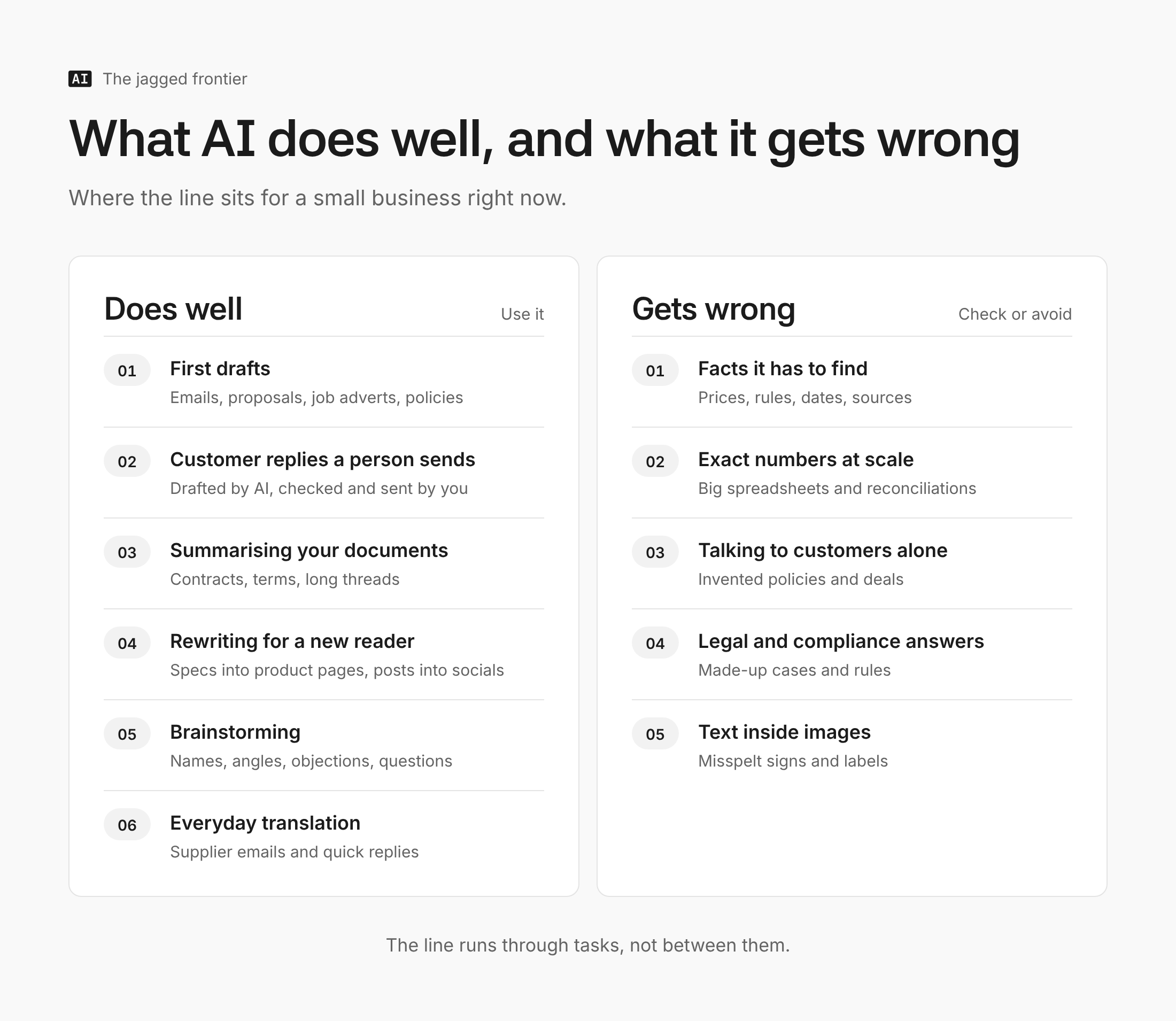
Six jobs AI does well right now
- First drafts of anything written. Emails, proposals, job adverts, policies. In a study published in Science, professionals using ChatGPT on writing tasks finished 40% faster and their work was rated 18% better.
- Customer support replies, with a person sending them. A study of 5,179 support agents found AI help raised the number of issues resolved per hour by 14% on average, and by 34% for newer, less experienced staff. The gain comes from drafting, not from letting the AI reply on its own.
- Summarising documents you give it. Contracts, supplier terms, long email threads. It's reliable enough to get the shape quickly, but not to skip reading the clauses that matter (more on that below).
- Rewriting for a different reader. Turning a technical spec into a product page, a complaint into a calm reply, or one blog post into a week of social posts.
- Brainstorming options. Names, angles, objections a customer might raise, questions to ask a supplier. Volume is the point, and a weak idea costs nothing.
- Everyday translation. Fine for understanding a supplier's email or drafting a reply. Research from translation firm Welocalize, which has an interest in the subject, found an AI model translated about as well as Google Translate. For anything legal, medical or customer-facing, have a fluent speaker check it.
Five jobs it still gets wrong
- Facts it has to find itself. When the European Broadcasting Union and BBC tested more than 3,000 answers from ChatGPT, Copilot, Gemini and Perplexity, 45% had at least one significant problem, and 31% had serious sourcing errors.
- Exact numbers across big spreadsheets. In a March 2026 benchmark of financial spreadsheets, the best models scored around 80% overall, but accuracy fell to 48.6% on the largest file. The research hasn't been peer-reviewed yet, but the pattern matches what most finance teams report: fine on small sheets, unreliable at scale.
- Talking to customers unsupervised. A car dealership's chatbot agreed to sell a Chevrolet Tahoe for $1. DPD's support bot swore at a customer and called DPD the worst delivery firm in the world. Coding tool Cursor's support bot invented a usage policy that didn't exist. Even Klarna, which once said its AI did the work of 700 agents, moved back towards human support in 2025.
- Legal and compliance answers. In June 2025 the High Court dealt with two cases built on fake citations, including one where 18 of 45 cited cases didn't exist. If lawyers get caught out, a business owner asking about employment law will too.
- Text inside images. AI image tools make good backgrounds and product scenes, but researchers testing 12 generators still call text rendering a persistent failure. Expect misspelt signs and garbled labels, and add any wording yourself.
A three-question test for everything else
Most real tasks sit somewhere between the two lists. Run them through these three questions before handing them over.
- Did you give it the facts, or does it have to find them? Your price list and policies in the prompt: safe. "What's the VAT threshold?": check it against the source.
- Can you check the answer in under a minute? A drafted email, yes. A 40-tab spreadsheet reconciliation, no.
- Does a person see it before a customer does? If not, keep it out of AI's hands until it has proved itself on supervised work.
Three yeses and it's a good AI job. One no means use it, but check the output. Two or more and do it yourself for now.
You can also make the AI help you check. Adding a line like this to the end of any prompt makes it point out its own weak spots:
Before you give me the final version, list any facts, figures or claims in your answer that you weren't given by me and that I should check before using it.
It won't catch everything, but it turns the riskiest sentences into a short checklist instead of something you have to find.
The mistakes that catch owners out
The jobs on the second list aren't the real danger. Most owners know not to trust AI with tax advice. The trouble comes from three quieter mistakes.
- Trusting it more as it improves. In a July 2025 study, experienced software developers believed AI had made them 20% faster when it had actually slowed them down by 19%. A 2026 follow-up suggests newer tools have since flipped that to a speed-up, but the lesson stands: how productive AI feels is a poor guide to how productive it is. Time the task.
- Assuming the newest, biggest model is the most accurate. On Vectara's leaderboard, which measures how often models invent details when summarising a document, several flagship models invent something in 7% to 12% of summaries, more than some smaller models. Every model needs checking.
- Letting a good task drift into a bad one. A tool that drafts your customer replies well can, a month later, be sending them. Each step feels small. Decide up front where the human check sits, and keep it there. AI Manual's guide to using AI without it making things up covers the habits that help.
Get advice built around your business
Which side of the line a task falls on depends on your business, your tools and how much a mistake would cost you. AI Manual is building a tool that works that out from a few questions about your business. It isn't open yet. Contact us and you'll be among the first in.
FAQ
Is AI accurate enough to use in a business?
For drafting, summarising and rewriting material you supply, yes, with a quick human check. For facts it has to find, exact figures and legal questions, not without verifying every claim against the original source.
Which AI is the most accurate?
There's no single winner, and it changes every few months. On summarising tests, smaller models sometimes invent less than flagship ones, so the safer habit is to give any AI your own facts and check its output, whichever you use.
Can AI run my customer service on its own?
Not safely yet. The firms that tried it publicly, from DPD to Cursor, ran into invented policies and embarrassing replies. Use it to draft replies a person approves, and look at what an AI agent is and whether your business needs one before letting software act alone.
Will AI get better at maths and numbers?
It already is. Google says an advanced version of Gemini reached gold-medal standard at the 2025 International Mathematical Olympiad. Contest maths isn't the same as reconciling messy business spreadsheets, though, so keep checking figures that matter.
The takeaway
Give AI the jobs where you supply the facts and can check the result quickly, and keep it away from finding facts, handling big numbers and talking to customers alone. If you're not sure where to begin, AI Manual's guide on where a small business should actually start with AI turns this into a two-week test. Pick one job from the first list and try it this week.